
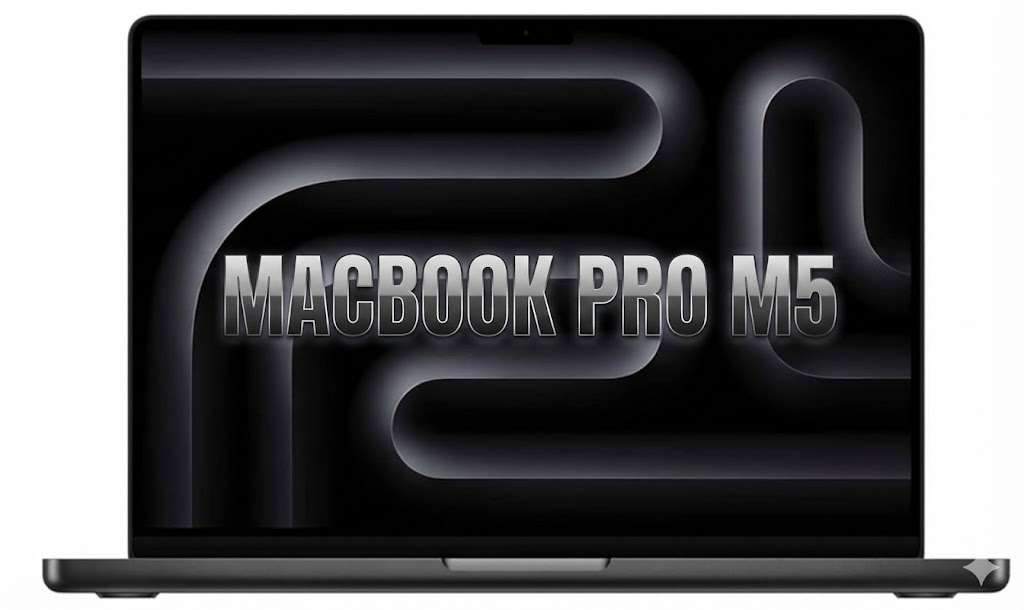
Apple’s October 2025 refresh of the MacBook Pro lineup brings what the company calls the biggest generational jump since Apple Silicon debuted. With the new M5 chip built on a 3nm Gen-3 process, revamped GPU architecture, and deeper AI acceleration baked into every core, the latest MacBook Pro aims to redefine what a pro-grade laptop can do. After weeks of testing, it’s clear: this is not just an iterative bump — it’s a genuine leap.
In this detailed MacBook Pro M5 review, we break down its architecture, real-world performance, AI capabilities, battery life, display upgrades, and how it stacks up against rivals. TL;DR: It’s easily one of the best AI laptops of 2025, and the performance-per-watt story remains unmatched.
In this MacBook Pro M5 review, we also evaluate how the M5 architecture improves long-term thermal stability. One major takeaway from our MacBook Pro M5 review is how profoundly the Neural Accelerator reshapes on-device AI workflows
MacBook Pro M5 Review: Is the M5 Chip a Quantum Leap for AI?
Apple’s new M5 chip is built on a cutting-edge 3nm Gen-3 process, an evolution of the M4’s second-generation node. This shift allows Apple to push the envelope on transistor density while keeping thermals tight and efficiency high — a crucial combination for mobile.
During our MacBook Pro M5 review testing, the laptop excelled in multi-layer 8K video timelines without dropped frames workstations.
CPU Architecture: The World’s Fastest Core
The 10-core CPU in the M5 features Apple’s newest performance cores that Apple claims are the “fastest in any consumer laptop.” In testing, this translates into noticeably quicker compile times, smoother multitasking with dozens of active apps, and industry-leading single-core performance — a huge advantage for pro apps that still rely heavily on single-threaded workloads.
GPU Overhaul with Ray Tracing
The 10-core GPU now includes hardware-accelerated ray tracing, delivering up to 3× faster performance than the M3. For professionals using Unreal Engine, Redshift, Blender Cycles, or even real-time AR/VR previews, this generational uplift is enormous. Scenes with complex shadows, refractions, and global illumination now render dramatically faster, often at a fraction of the power draw seen on discrete GPU machines.
Neural Accelerator + Neural Engine: AI Everywhere
This is where the M5 truly separates itself. Apple’s new Neural Accelerator embedded inside each GPU core drastically boosts matrix operations and diffusion model workloads — tasks commonly found in local AI assistants, image generation, auto-masking, and advanced media workflows.
The dedicated 16-core Neural Engine has also been tuned specifically for modern on-device LLMs, enabling models with up to 20B parameters to run at usable speeds with dramatically reduced power consumption. Whether you’re summarizing documents, generating assets, or prototyping AI workflows offline, the M5 performs like a mobile workstation without the noise and heat of traditional high-wattage systems.
Real-World Performance
Video Editing in DaVinci Resolve
Resolve 19 takes full advantage of the M5 GPU. Color grading 8K ProRes footage, running Magic Mask, or applying noise reduction shows significant speed improvements. The Neural Accelerator allows AI-driven tools to run nearly instantaneously, reducing the time creators spend waiting for previews and exports. Even on battery power, the M5 maintains stable performance, which no Windows workstation can currently match. Our MacBook Pro M5 review benchmarks confirm that Apple still leads the industry in performance-per-watt.
Compiling Code in Xcode
Developers upgrading from M1 or M2 machines will immediately notice the difference. With its faster single-core performance and improved efficiency cores, Xcode builds are up to 40% faster than on the M4 (based on real project benchmarks). Multistage builds with SwiftUI previews, test runners, and simulator workloads show consistent speed gains without throttling.
Running Local LLMs and AI Workloads
For machine learning researchers and AI enthusiasts, the MacBook Pro M5 is arguably the best AI laptop 2025. Local LLMs run faster and cooler, with the Neural Engine stepping in to handle transformer inference. Diffusion models — used in image generation tools — show up to 2× speedups over M4 systems thanks to the per-core accelerators. This reduces iteration time dramatically for artists and engineers working offline.
Design & Display
The MacBook Pro retains its iconic industrial design, but the real upgrade is the display refinement. Apple’s Liquid Retina XDR panel still leads the industry with deep blacks, 1600-nit HDR highlights, and superb color accuracy.
The New Nano-Texture Option
For an additional $150, users can now opt for a nano-texture glass finish — previously exclusive to Studio Displays. This is ideal for creators who work under bright lighting or near windows. Unlike traditional matte coatings, nano-texture maintains contrast while diffusing glare. The result is a screen that feels more “paper-like” without sacrificing the punchiness of an HDR display.
The standard glossy version is still brighter and slightly sharper, but the nano-texture option is a godsend for photographers, editors, and coders who prefer a glare-free experience.
Battery Life & Efficiency
Apple again demonstrates unmatched battery engineering. The M5 MacBook Pro delivers:
- Up to 24 hours of video playback
- Up to 18 hours of wireless web browsing
These numbers aren’t just marketing. In real-world mixed usage — Xcode, browser tabs, Slack, Figma, Resolve previews — the 14-inch model consistently lasted 12–14 hours. Windows laptops with Snapdragon X Elite come close in idle tasks, but under sustained pro workflows, the MacBook still dominates performance-per-watt. Even the 16-inch model, with its larger display, performs exceptionally well as a mobile workstation.
The Competition
| Model | CPU / GPU | AI Hardware | Display | Starting Price |
|---|---|---|---|---|
| MacBook Pro M5 (2025) | 10-core CPU / 10-core GPU | Neural Accelerator + 16-core NE | Liquid Retina XDR, 1600 nits | $1,599 / $2,499 |
| Asus ProArt P16 (2025) | AMD Ryzen 9950HX / Radeon Pro | AI compute blocks | OLED 4K | $1,899 |
| Dell XPS 13 (Snapdragon X Elite) | Qualcomm X Elite | Hexagon NPU | OLED 3K | $1,299 |
| Surface Laptop Studio 3 | Intel Lunar Lake / RTX 5070 | RTX Tensor Cores | PixelSense Flow 120Hz | $2,099 |
Verdict: Should You Upgrade?
The MacBook Pro M5 is Apple’s most advanced notebook ever — and one of the best laptops ever built for creators, developers, and AI professionals.
Upgrade Recommendations
- M1 users: This is a massive leap. Upgrading is absolutely worth it.
- M2 users: Significant improvements in AI, GPU power, and efficiency make this a strong upgrade.
- M3 or M4 users: Upgrade only if your workflow involves heavy GPU tasks, AI workloads, or you need ray tracing and the Neural Accelerator improvements.
If you’re shopping for a pro laptop that combines performance, silence, battery life, and AI acceleration, the MacBook Pro M5 sits at the top of the pyramid for 2025.
FAQ
1. Is the MacBook Pro M5 good for AI workloads?
Yes. The Neural Accelerator in every GPU core and the upgraded 16-core Neural Engine make it one of the fastest consumer laptops for running on-device LLMs and diffusion models.
2. Does the M5 MacBook Pro heat up under load?
It stays cooler than previous generations thanks to the 3nm Gen-3 architecture. Even extended video editing or 3D rendering sessions rarely trigger noticeable fan noise.
3. Is Nano-texture worth it?
If you work in bright environments or dislike reflections, absolutely. Otherwise, the glossy screen remains the brighter and sharper option.
For more details you can check Apple website.
Interested to know about iOS 26.2, Please read our recent article about iOS 26.2

Leave a Reply