
From fixing the controversial “Liquid Glass” to major upgrades for CarPlay and Apple Music, here is your deep dive into the December IOS 26.2 Beta update.
If iOS 26 was the “Rebrand” update that brought us the futuristic (and sometimes polarizing) Liquid Glass design, then iOS 26.2 is the “Refinement” update.
Apple has just dropped the latest Beta for developers, and it addresses the biggest community complaints while sneaking in some powerful new utilities. After testing the beta on the iPhone 17 Pro for 48 hours, here is everything new coming to your device this December. iOS 26.2 Beta
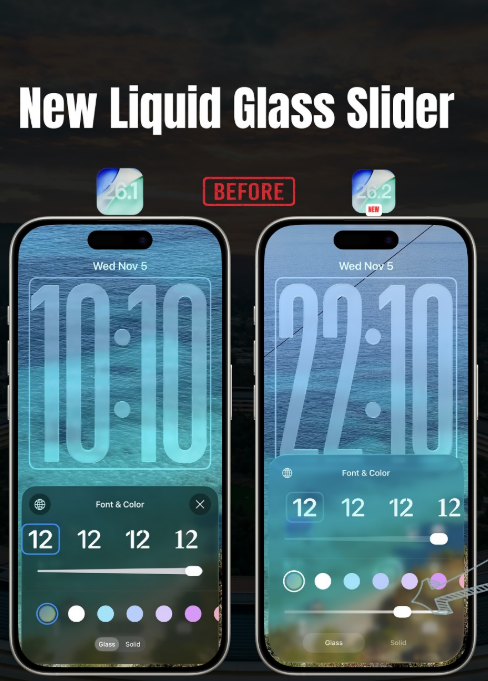
1. The “Liquid Glass” Fix is Finally Here in iOS 26.2 Beta
The transparent “Liquid Glass” interface looked great in Apple’s keynotes, but in real life, it often made text hard to read against busy wallpapers.
- The Fix: Apple has added a Granular Opacity Slider.
- How to use it: When customizing your Lock Screen, tap the clock or widgets. You can now slide between “Clear,” “Frosted,” and “Solid.”
- Why it matters: You no longer have to choose between a cool wallpaper and a readable clock. You can dial in the perfect amount of blur.
2. Productivity: “Urgent” Reminders & Freeform Tables
The Reminders app gets its most significant functional update in years.
- Urgent Mode: You can now toggle a task as “Urgent.” Unlike standard notifications that ping once, an Urgent task acts like an alarm—it will persistently ring and bypass your Silent/Focus modes until you mark it complete or snooze it.
- Freeform Tables: The digital whiteboard app
Freeformfinally supports Tables. This sounds boring until you use it—it makes organizing project boards and roadmaps significantly easier on the iPad and iPhone.
3. Media: Offline Lyrics & Podcast “X-Ray”
- Apple Music: The days of needing 5G to see lyrics are over. Real-time lyrics are now cached offline along with your downloaded tracks.
- Podcasts Intelligence: The app now uses on-device AI to generate “Smart Chapters” for episodes that don’t have them. Even better, it lists “Mentions”—automatically extracting books, movies, or websites discussed in the episode and providing direct links. iOS 26.2 Beta
4. CarPlay Gets Dense
For drivers, iOS 26.2 is a major upgrade that finally makes use of wider dashboard screens.
- Widget Stacks: You can now see up to three widget stacks simultaneously on supported wide-screen dashboards. This means you can have Maps, Music, and your Calendar/Weather all visible without swiping. But it’s not just static; the new ‘Smart Stack’ logic intelligently rotates the secondary widgets based on your driving context—surfacing EV range or tire pressure alerts exactly when needed.
- Dual-Screen Flow: For vehicles with digital instrument clusters, 26.2 finally allows you to “throw” the full Map view to the driver’s display while keeping media controls locked to the center console, effectively doubling your usable screen real estate.
- Pinned Conversations Toggle: A small but welcome fix—you can now disable “Pinned Conversations” in CarPlay Messages to declutter your driving interface.
5. Accessibility: Screen Flash
For users who keep their phone on silent face-up on a desk, the LED flash on the back was useless for notifications.
- The New Feature: You can now enable Screen Flash. When a notification hits, your entire display will pulse (you can choose the color), ensuring you catch alerts even in a noisy room.
6. Health: The New Sleep Score
Apple has recalibrated the Sleep Score algorithm to be more medically accurate (and admittedly, a bit stricter).
- The New Scale:
- 0-40: Very Low
- 41-60: Low
- 61-80: OK
- 81-95: High
- 96-100: Very High
- Note: Don’t be alarmed if your score drops by 5-10 points after updating to iOS 26.2 Beta; the grading curve has just gotten steeper.
Release Date Expectation
Apple historically releases its “.2” updates just before the holiday shutdown.
- Expected Release: December 15 – 18, 2025
- Public Beta: Available Now.
For more details please visit Apple
If you are interested in travel please visit our Travel blogs

Leave a Reply