
The iOS 26.3 features are finally here, and they represent one of the most significant shifts in Apple’s history. Released as a public beta on December 17, 2025, this update proves that Apple is ready to embrace a more open future. From groundbreaking cross-platform tools to stunning new customization options, iOS 26.3 is the brilliant update we’ve all been waiting for.
Whether you are looking to stay in the ecosystem or considering a change, the iOS 26.3 features offer unprecedented freedom and flexibility.
1. The Incredible “Transfer to Android” Native Tool
For the first time ever, Apple has introduced a native, seamless way to move your life from an iPhone to an Android device. Located in Settings > General > Transfer or Reset iPhone, this tool eliminates the need for clunky third-party apps.
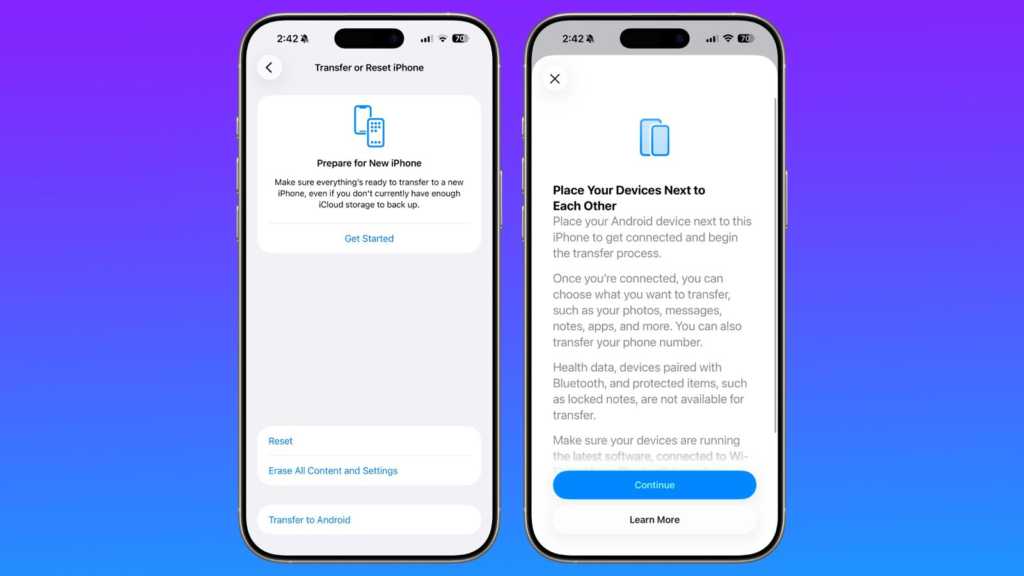
- How it works: Simply place your iPhone next to an Android device.
- What moves: Photos, videos, messages, notes, passwords, and even your phone number.
- The Benefit: It uses a high-speed wireless connection (Wi-Fi and Bluetooth) to ensure your data is safe and the transition is effortless.
2. Empowering Interoperability: Notification Forwarding
In a massive win for wearable fans, iOS 26.3 introduces Notification Forwarding. This feature allows your iPhone notifications to be mirrored on third-party smartwatches like Garmin, Samsung, or Wear OS devices with the same reliability as an Apple Watch.
Note: This feature is currently rolling out primarily in the European Union to comply with the Digital Markets Act, but the settings are visible to beta testers worldwide.
- Customization: You can choose exactly which apps forward alerts to your non-Apple wearable.
- Limitation: To ensure privacy, you can only forward to one device at a time. If enabled, notifications will pause on your Apple Watch to prevent double-alerts.
3. Refresh Your Screen: New Weather Wallpapers
Apple has completely overhauled the wallpaper gallery. The previously combined “Weather & Astronomy” section has been split.
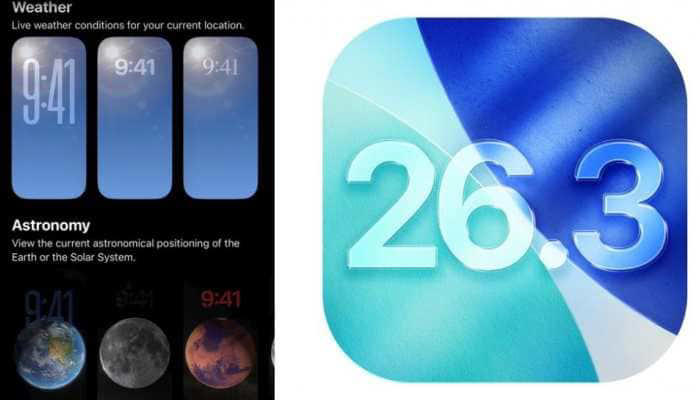
What’s New in the Weather Gallery?
- Dedicated Section: A new row specifically for real-time weather visuals.
- Dynamic Designs: Three new pre-designed layouts featuring varied typography and widgets.
- Live Updates: The backgrounds continue to change in real-time, reflecting the exact atmosphere outside your window.
4. Hidden Gems in the iOS 26.3 Beta
Beyond the headlines, several powerful under-the-hood improvements make this update a must-have for tech enthusiasts:
- Powerbeats Pro 2 Support: The update includes specialized code for the new Powerbeats Pro 2, enabling heart rate monitoring and advanced performance metrics directly in the Fitness app.
- Apple Intelligence Optimization: Refined AI battery management that predicts charging times more accurately based on your usage habits.
- Enhanced Security: Critical patches that build upon the stability of iOS 26.2.
Why is it called iOS 26.3?
If you’re wondering why we jumped from iOS 18 to iOS 26, remember that Apple officially changed its naming convention in June 2025. Versions now align with the calendar year, making it simple for users to know exactly how current their software is.
Summary Table: iOS 26.3 Quick Facts
| Feature | Description | Availability |
| Transfer to Android | Native, wireless data migration tool. | Worldwide (Beta) |
| Notification Forwarding | Mirrors alerts to 3rd-party smartwatches. | EU Focus (Global Beta) |
| Weather Wallpapers | Dedicated section with 3 new live designs. | Worldwide |
| Release Date | Public Beta: Dec 17 | Final: Late Jan 2026 |
Final Thoughts
The iOS 26.3 features represent a perfect balance of user freedom and Apple’s signature polish. It is a terrific step toward a more connected world where your hardware doesn’t limit your choices.
Ready to test it yourself? Visit the Official Apple Beta Software Program to enroll your device today.
How to Use the New iOS 26.3 “Transfer to Android” Tool: A Step-by-Step Guide
Ready to make the switch? With the release of iOS 26.3, Apple has finally introduced a superb native way to migrate your data to Android. This guide will show you how to use this powerful new feature for an effortless transition. As Apple continues to unify its ecosystem (as seen with the cross-platform refinements in macOS Tahoe 26.2), switching between different hardware brands is becoming easier than ever.
Step 1: Locate the Transfer Tool
Open Settings on your iPhone, navigate to General, and tap Transfer or Reset iPhone. You will now see the new “Transfer to Android” button.
Step 2: Connect and Move
- The Connection: Scan the QR code on your Android device with your iPhone.
- Choose Your Data: Select Photos, Messages, Notes, and even your eSIM to port over.
- The Transfer: The high-speed wireless tunnel makes the process incredibly fast.
Step 3: Finalize
Once the progress bar completes, your Android phone is ready to go, and your iPhone will offer a safe “Erase” option.
Leave a Reply