
This OxygenOS 16 Review takes a deep look at OnePlus’s latest Android 16–based operating system update. OxygenOS 16 represents a mature evolution of the OnePlus software philosophy, focusing on AI-powered productivity, smoother performance, modern customization, and cross-device connectivity.
Unlike previous versions that focused mainly on speed, OxygenOS 16 aims to be both intelligent and efficient, making everyday smartphone usage more organized and intuitive.
What Is OxygenOS 16?
OxygenOS 16 is the newest version of OnePlus’s custom Android skin built on Android 16. In this OxygenOS 16 Review, it’s clear that OnePlus has designed the OS around three pillars:
- Smart AI assistance
- Fluid performance and stability
- Seamless interaction across devices
OxygenOS 16 blends a clean interface with useful system-level features rather than overwhelming users with excessive options.
OxygenOS 16 Review: Key New Features
Mind Space: Intelligent Content Organization
A standout highlight in this OxygenOS 16 Review is Mind Space, an AI-driven content hub that helps users save and organize information.
With Mind Space, users can:
- Save screenshots, notes, and text snippets
- Organize content automatically
- Search saved items using natural language
- Convert saved content into actions like reminders or plans
This feature transforms random saved data into meaningful, usable insights, making OxygenOS 16 especially useful for productivity-focused users.
OnePlus has outlined all official features and updates of OxygenOS 16 on its official OxygenOS platform page.
Gemini AI Integration
Another important aspect of this OxygenOS 16 Review is the deep Gemini AI integration. Instead of being limited to a standalone app, AI in OxygenOS 16 works at the system level to:
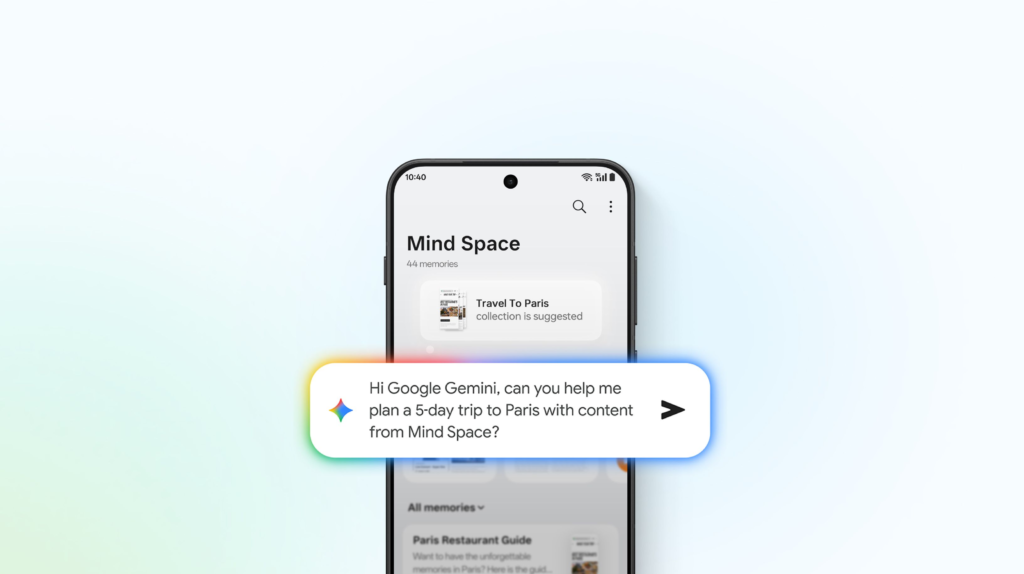
- Understand user intent
- Summarize saved information
- Assist in planning tasks
- Improve contextual suggestions
This practical AI implementation helps OxygenOS 16 stand out from many competitors that focus on surface-level AI features.
Lock Screen Customization
OxygenOS 16 introduces a refreshed lock screen experience with advanced customization options. According to this OxygenOS 16 Review, users can:
- Customize clock styles and layouts
- Add widgets and shortcuts
- Adjust fonts and color schemes
- Create a personalized lock screen design
This balances modern aesthetics with usability, without making the interface feel cluttered.
Performance and Smoothness Improvements
Performance remains a strong point in this OxygenOS 16 Review. The update brings:
- Faster app launches
- Smoother animations
- Improved multitasking
- Better background resource management
Even during heavy usage, OxygenOS 16 maintains consistent responsiveness, reinforcing OnePlus’s reputation for smooth software experiences.
Cross-Device Connectivity
OxygenOS 16 enhances OnePlus’s ecosystem through improved cross-device connectivity. In this OxygenOS 16 Review, key highlights include:
- Wireless photo sharing between platforms
- File transfer across devices
- Remote access to PCs
- Basic smartwatch notification syncing
These features make OxygenOS 16 appealing to users who regularly switch between devices.
Privacy and Security Enhancements
Security is another area emphasized in this OxygenOS 16 Review. OxygenOS 16 includes:
- Improved permission management
- Enhanced background activity controls
- Privacy-focused AI processing
- Better transparency for app behavior
These changes align with Android 16’s broader focus on user privacy.
Pros and Cons of OxygenOS 16
Pros Highlighted in This OxygenOS 16 Review
- Clean and modern UI
- Practical AI-powered Mind Space
- Smooth and responsive performance
- Useful lock screen customization
- Strong cross-device connectivity
Cons Highlighted in This OxygenOS 16 Review
- Some features depend on device and region
- Less resemblance to older OxygenOS versions
- Learning curve for advanced AI tools
- Ecosystem depth not as strong as Samsung’s
OxygenOS 16 Review: Comparison With Competitors
OxygenOS 16 vs Samsung One UI
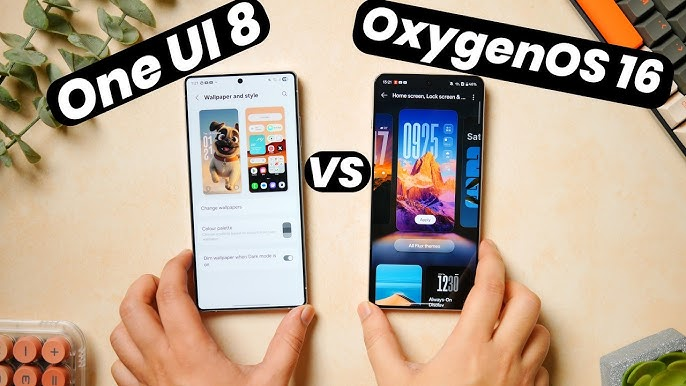
OxygenOS 16 advantages:
- Cleaner interface
- Faster animations
- Less visual clutter
One UI advantages:
- Deeper ecosystem integration
- More advanced customization
- Better tablet and wearable support
OxygenOS 16 vs Pixel Android
OxygenOS 16 advantages:
- More customization options
- Better multitasking features
- Built-in AI productivity tools
Pixel Android advantages:
- Faster updates
- Pure Google experience
- Strong camera-focused AI
OxygenOS 16 vs Xiaomi HyperOS
OxygenOS 16 advantages:
- Consistent performance
- Minimal bloatware
- Cleaner user interface
HyperOS advantages:
- Extensive theming options
- Deeper brand ecosystem
- More visual customization
OxygenOS 16 vs Nothing OS
OxygenOS 16 advantages:
- More powerful AI features
- Better productivity tools
- Wider device support
Nothing OS advantages:
- Unique design identity
- Minimalist UI approach
- Simpler learning curve
Who Should Upgrade Based on This OxygenOS 16 Review?
You should consider OxygenOS 16 if you:
- Prefer smooth and stable performance
- Want AI that improves productivity
- Use multiple devices daily
- Like customization without clutter
You may skip or delay if you:
- Prefer ultra-minimal software
- Need deep ecosystem-level features
- Want maximum manual customization
Final Verdict: OxygenOS 16 Review Summary
This OxygenOS 16 Review concludes that OxygenOS 16 is a polished, intelligent, and performance-focused Android UI. While it may not offer the deepest ecosystem or the boldest design, it excels in smoothness, usability, and smart organization.
For OnePlus users, OxygenOS 16 is a worthwhile upgrade that enhances everyday smartphone usage in meaningful ways.
If you’re planning to buy a new OnePlus phone, our detailed OnePlus 15R full review explains how OxygenOS 16 performs on real hardware.
Leave a Reply