
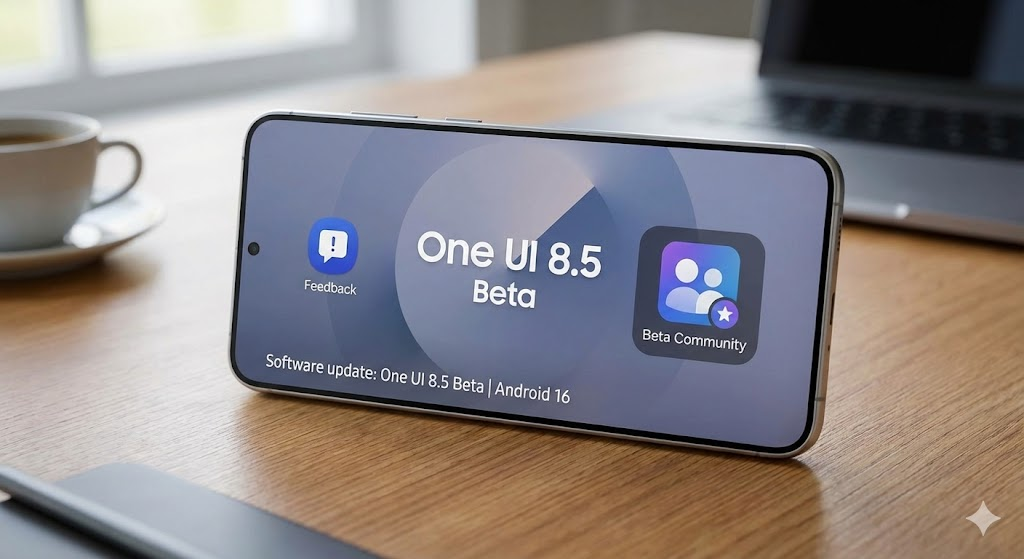
Samsung has kicked off its most ambitious mid-cycle software initiative yet: the One UI 8.5 Beta program. Built upon the foundation of Android 16, this update is not merely a collection of minor tweaks; it’s a strategic overhaul designed to fulfill Samsung’s vision of a truly frictionless, intelligent, and secure Galaxy ecosystem.
For many Galaxy users, the One UI 8.5 Beta represents the single most important software milestone this year.
This comprehensive, authoritative deep dive targets tech enthusiasts and early adopters, focusing on the core pillars of the 8.5 release: enhanced productivity powered by AI, seamless cross-device connectivity, and next-generation digital security. Below, we break down every major feature, explain the underlying technological shifts, and guide you through the initial beta availability.
🧠 The Nexus of Intelligence: Key New Features in One UI 8.5 Beta
One UI 8.5 leverages advanced on-device AI and refined system architecture to introduce sophisticated features that actively anticipate user needs and streamline complex workflows.
1. Enhanced AI Photo Assist Workflow: The Non-Destructive Editor
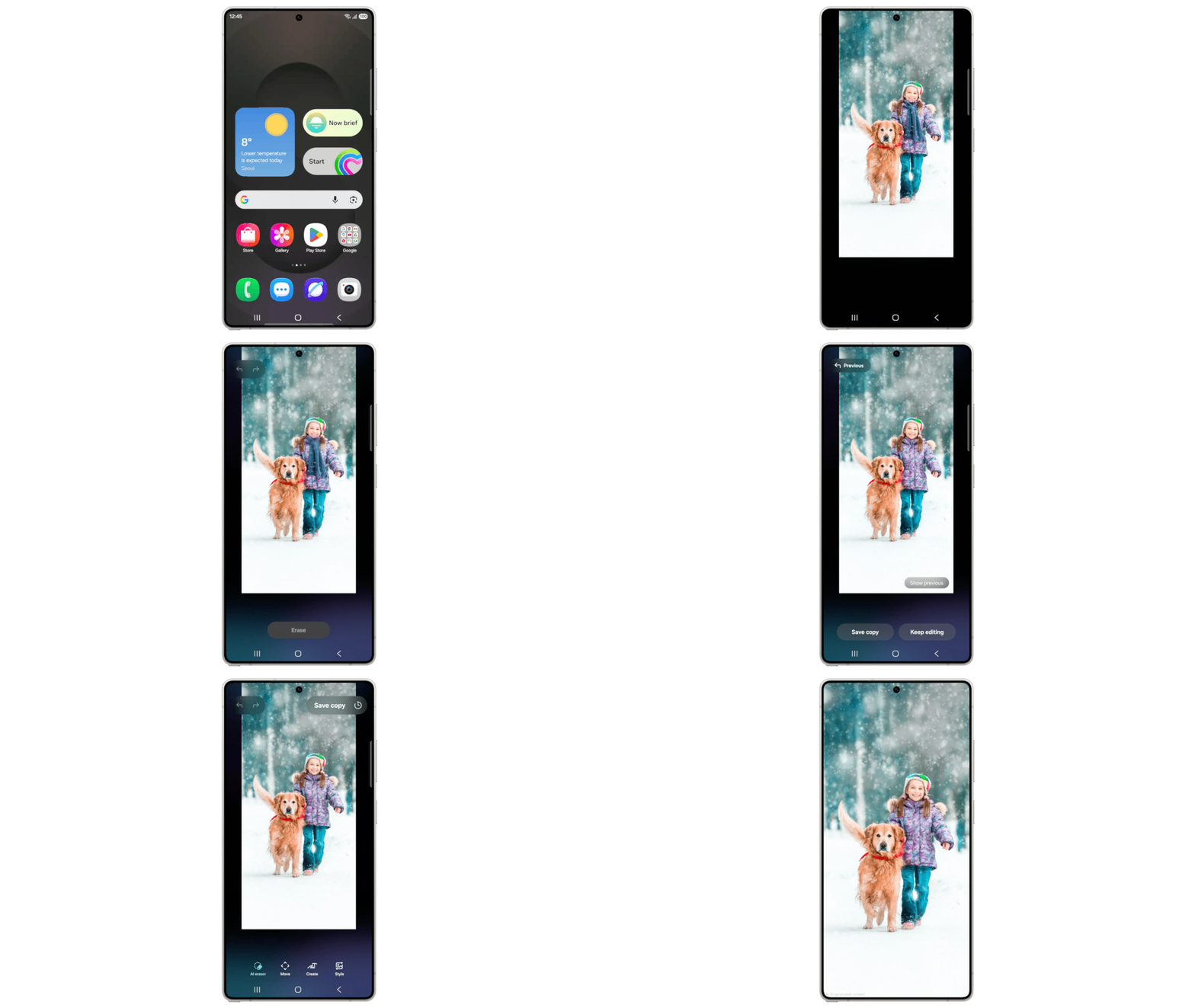
The sophisticated AI Photo Assist workflow is one of the standout features defining the One UI 8.5 Beta experience. The AI Photo Assist feature has undergone a fundamental redesign, moving from a single-pass processing tool to a continuous, non-destructive editing suite that mimics professional desktop software.
Continuous Editing and Generative Iteration
The most significant change is the ability to apply consecutive AI edits without the requirement of saving an intermediate file. In previous iterations, utilizing Generative Edit to reposition an object, followed by using Object Eraser, would necessitate saving the first result, cluttering the device’s storage.
- Non-Blocking Workflow: Users can now stack AI operations—such as background replacement, object manipulation, and tone adjustments—in rapid succession. The system holds the transformations in memory, displaying the cumulative result in real-time.
- Performance Benefit: This reduction in read/write cycles not only speeds up the editing process but also conserves internal storage and reduces thermal load, allowing for longer, more complex sessions.
The Edit History Timeline
A crucial companion feature to continuous editing is the introduction of a persistent Edit History Timeline.
- Version Control: Like history panels in Photoshop or other creative suites, this timeline records every state-changing action taken during the current editing session.
- Instant Reversion: Users can instantly step backward to any point in the history—before a crop, before an object deletion, or before a filter application. This provides true creative freedom, encouraging experimentation without the fear of permanently ruining the original image or committing to an unwanted change. This capability significantly elevates the quality and professionalism of mobile photo editing on Galaxy devices.
2. Smarter Quick Share: Intelligence in Distribution
Quick Share, Samsung’s high-speed file transfer protocol, evolves from a proximity-based utility into an intelligent social tool by incorporating advanced on-device face recognition technology.
- Intelligent Contact Suggestions: When a user selects a collection of photos (e.g., from a group event), Quick Share’s integration with the Gallery app’s existing face-grouping data kicks in. The feature scans the selected images and proactively suggests relevant contacts who appear in the photos.
- Privacy and Efficiency: This processing is handled securely and entirely on-device to maintain user privacy. The result is unparalleled sharing efficiency, eliminating the tedious manual process of selecting recipients for dozens of event photos. For example, after a wedding, the user can select an album, and Quick Share will instantly suggest sharing with the bride, groom, and key family members present in the shots.
🌐 The Connected Galaxy: Cross-Device Ecosystem Unification
One UI 8.5 significantly erodes the boundaries between different Galaxy hardware, making the collective of Samsung devices behave as a singular, extended computing surface.
3. Storage Share: The Unified File System
Storage Share is arguably the most impactful ecosystem feature in One UI 8.5, solving the decades-old problem of file accessibility across personal devices. It creates a distributed, unified storage layer accessible through the familiar My Files app.
Technical Implementation
Storage Share doesn’t necessarily sync every file (which would consume massive bandwidth); instead, it operates as a secure, on-demand remote file browsing utility.
- Direct Access: Within the My Files app on a primary device (e.g., a Galaxy S25 Ultra), a new “Connected Devices” category appears. This allows direct browsing of the internal storage of secondary devices, including:
- Galaxy Tablets: Accessing notes or art files.
- Galaxy Books (PCs): Retrieving desktop documents or downloaded assets.
- Samsung Smart TVs: Accessing media libraries stored on an attached USB drive.
- Mechanism: Access is granted through a secure, authenticated link via the Samsung Account, leveraging a low-latency local network connection (Wi-Fi Direct or Bluetooth LE) for the initial handshake and file metadata transfer. This effectively turns every Galaxy device into a network-attached storage (NAS) node for the user’s personal ecosystem.
4. Audio Broadcast using Auracast and LE Audio
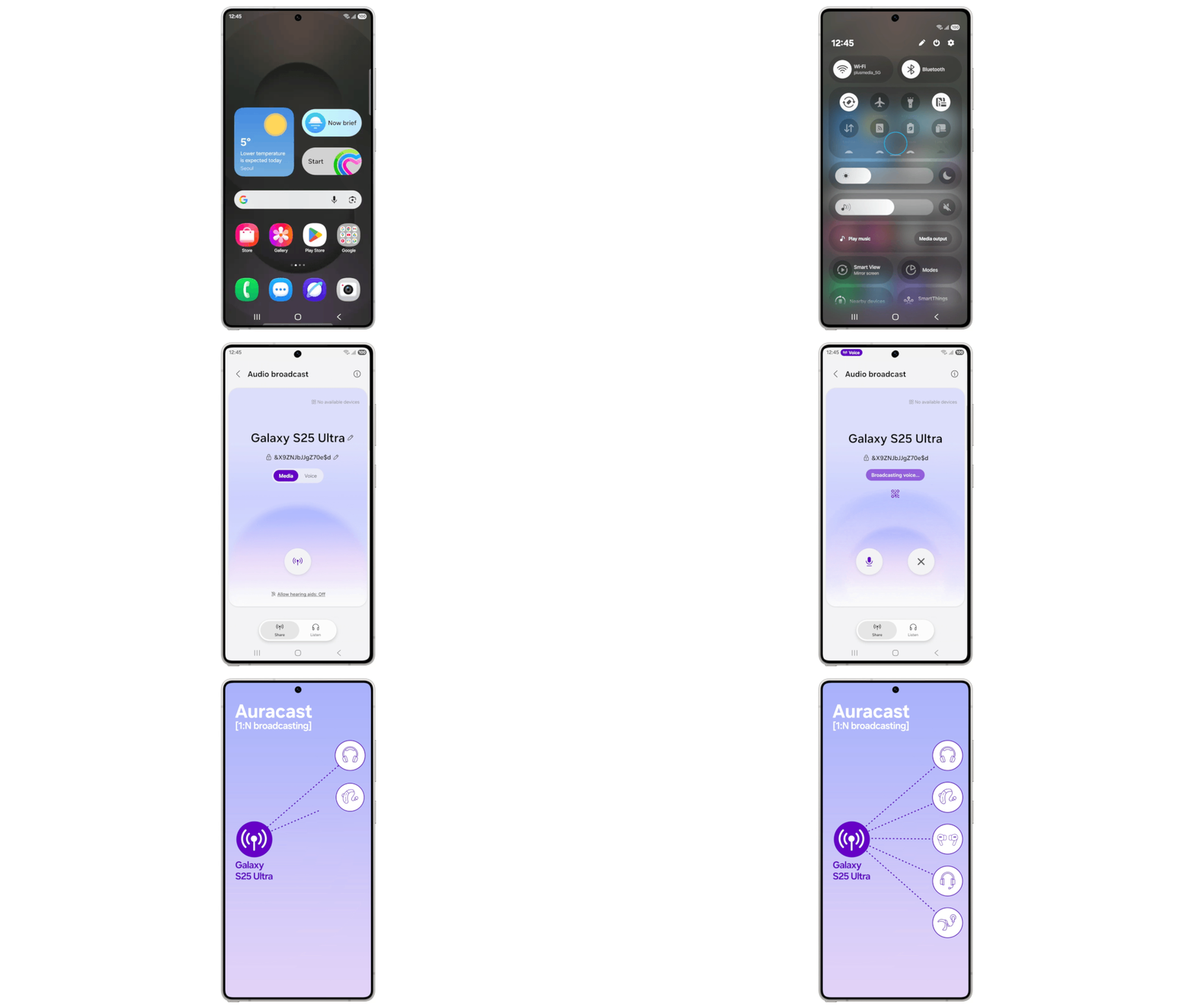
Building on the foundation of the Bluetooth Low Energy (LE) Audio standard, One UI 8.5 transforms the Galaxy device into a dynamic, low-power broadcasting hub using Auracast.
Voice Transmission Capability
While Auracast previously enabled broadcasting media (music, podcasts) to multiple paired earbuds, 8.5 introduces Voice Transmission.
- Functionality: The phone’s built-in microphone captures the user’s voice, which is then encoded and simultaneously broadcasted to all nearby LE Audio-compatible devices (like Galaxy Buds, hearing aids, or speakers) that have joined the specific Auracast session.
- Impact: This has profound real-world applications:
- Accessibility: Providing clear, low-latency audio transmission for public speaking or instructional use in areas with high ambient noise.
- Silent Public Broadcasting: Creating a “silent disco” or personal audio feed for events without requiring complex hardware.
- Low-Power Usage: Utilizing LE Audio minimizes the drain on the phone and the receiving devices, making it practical for extended use.
🔒 Fortifying the Digital Frontier: Security & Privacy Enhancements
Samsung recognizes that advanced features must be underpinned by uncompromising security. One UI 8.5 introduces deep system-level safeguards to protect the user’s data and device integrity.
5. Theft Protection & Remote Lock
This feature is a direct response to rising concerns over physical device theft and subsequent data compromise.
- Hardened Factory Reset Prevention: If an unauthorized user attempts to perform a factory reset without the correct Samsung Account credentials, the system will prevent the device from booting past the initial setup screen, rendering the hardware useless until the legitimate owner intervenes.
- Automatic Remote Lock: If the device detects suspicious activity (e.g., sudden loss of connection in an unfamiliar location, repeated failed authentication) or if the SIM card is swapped, the device can automatically trigger a remote lock via the Find My Mobile service, securing the data before the user can manually report the theft.
6. Failed Authentication Lock Protocol (FALP)
The Failed Authentication Lock introduces a sophisticated defense against brute-force attacks on the lock screen.
- Adaptive Lockout: After a specified number of consecutive failed biometric or password attempts (e.g., 5 or 10), the system doesn’t just increase the timeout; it triggers a more severe protocol.
- Data Encryption Check: This protocol requires a full, verified Identity Check (often involving a secondary device login or a PIN linked to the Samsung Account) before the device will accept any further authentication attempts. This renders automated guessing methods unfeasible and immediately flags potential intrusion.
7. Expanded Identity Check Scope
Security verification is now required for a broader range of sensitive system configurations.
- Scope Expansion: Previously, Identity Checks were limited to payment settings and Samsung Account changes. One UI 8.5 extends this requirement to critical areas such as:
- Accessibility Settings: Preventing unauthorized manipulation of features like TalkBack, which could be exploited.
- Biometric Data Management: Requiring re-authentication before deleting or adding fingerprints/faces.
- Developer Options: Placing a security gateway before accessing low-level system configuration tools.
🛠️ Refined Functionality: Quality of Life Upgrades
These smaller, yet impactful, changes address daily usability and personalization.
- The Fully Customizable Quick Panel: Users can now relocate every single toggle and slider within the Quick Panel, including the brightness slider and device control icons, allowing for highly efficient, tailored access to the most-used controls.
- Enhanced Battery Management Dashboard: The redesigned screen provides cleaner, more granular consumption data, alongside easy-to-understand profiles: Standard (Performance Priority), Optimized (AI-Managed Balance), and Maximum (Strict Resource Control). This demystifies battery life management for the average user.
- Weather-Integrated Alarms: Alarms within the Clock app now feature dynamic, contextual backgrounds and visuals that subtly reflect the current local weather, providing a softer, more integrated way to start the day.
- Refined Lock Screen Customization API: New developer APIs allow for even deeper customization of third-party widgets and clock styles on the Lock screen, moving beyond basic repositioning and introducing dynamic, responsive elements.
📊 Compatible Devices & Beta Availability
Initial Launch Eligibility (Phase 1)
The One UI 8.5 Beta is initially reserved for Samsung’s most recent flagship line:
| Device Family | Models Eligible |
| Galaxy S25 Series | S25, S25+, S25 Ultra |
Initial Beta Availability Regions
The initial rollout is a carefully managed, geographically limited launch:
- Germany
- India
- Korea (South)
- Poland
- The UK (United Kingdom)
- The U.S. (United States)
Joining the Beta Program
Users with an eligible device in a supported region must follow the official path:
- Update Samsung Members: Ensure the Samsung Members application is updated via the Galaxy Store.
- Enrollment: Open the app and look for the “One UI 8.5 Beta Program” notice or banner.
- Registration: Follow the on-screen prompts, agree to the terms (which usually include warnings about potential bugs and data backup necessity), and complete registration.
- Download: Once approved (which is often immediate), navigate to Settings > Software update > Download and install to initiate the download of the beta firmware package.
Anticipated Expansion Timeline
While the S25 series leads the charge, the program is expected to broaden rapidly:
- Phase 2 (Immediate Future): The beta is anticipated to expand to the Galaxy S24 series (S24, S24+, S24 Ultra) and potentially the Galaxy Z Fold/Flip 6 devices.
- Stable Rollout: The finalized, stable release of One UI 8.5 will likely follow a rigorous testing period, typically commencing its phased rollout to older flagships (S24, S23, Z series) in the early months of the following calendar year, and is expected to be pre-installed on the future Galaxy S26 line.
🔮 Conclusion: Setting the Standard for Android Ecosystems
The One UI 8.5 Beta is Samsung’s definitive statement on the future of the mobile-centric ecosystem. It moves beyond incremental improvements, delivering features like Storage Share and the sophisticated AI Photo Assist workflow that truly change how users interact with their multiple devices.
By aggressively integrating next-generation AI and building on the core security foundation of Android 16, Samsung is positioning the Galaxy experience as one of the most productive, connected, and secure environments available.
The beta is a crucial opportunity to experience these innovations firsthand. Will you be diving into the One UI 8.5 Beta, and which of these major features are you most excited to test? Share your thoughts below!
For more details about One UI 8.5, visit One UI 8.5 Beta
For our recent articles on Technology, Food, Travel and Devotional topics please visit Smart Explorer
Leave a Reply to Samsung Galaxy S26 Specifications: Rumors & Expected Changes Cancel reply